


Price: IDR771,358.08 - IDR603,635.08
(as of Feb 02, 2026 04:27:05 UTC – Details)
Product description


1 1 USB C & 3 USB A Port
2 More Stable Transmission
3 Button or Control Switch

1 What’s in The Box
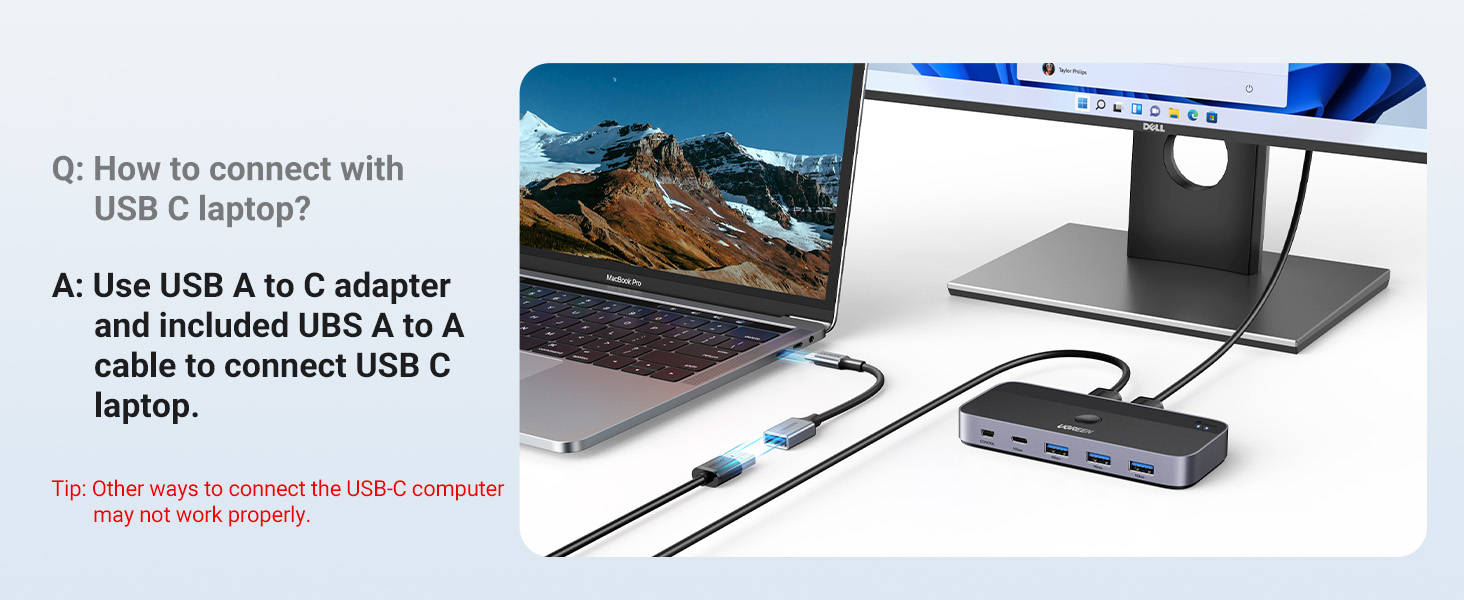
2 Connect USB C Laptop
Attention
NO KVM Switch This USB switch has no HDMI port and doesn’t support sharing a display between two computers. NOT Video Transfer Designed for data transfer only, not video transmission. Keyboard & Mouse Disconnection 1. Due to 2.4GHz interference between wireless signals, multiple wireless devices connected to the USB switch may not function properly (industry issue).If interference occurs, switch your devices from 2.4GHz to 5GHz. 2.If the device srtill does not work properly, connect the power adapter to provide sufficient power supply. Avoid Using a USB Hub Not connect the switch through a USB Hub, as it may degrade signal quality. For stable signal transmission, connect the USB cable directly to your computer’s USB port. Power Supply Requirement 1. Standard power adapter: 5V 2A (not included). Non-standard adapters may cause the device to malfunction even when connected. 2. The power port supplies power only to USB devices, not to computers. Recommended USB Cable 1. Use the included 1.5m USB A to A cables for best performance. 2. Using extension cables or third-party USB cables longer than 1.5m may cause signal instability. For USB-C Computer To connect this switch to a Mac or other USB-C-only computers, use a USB-C to A adapter with a USB A to A cable. A USB-C to A cable alone won’t work. PC Sleep Mode Issue If USB devices disconnect after waking from sleep, disable power-saving setting. 1. For Windows : Control Panel > System and Security > Power Options > Change Plan Settings > Change Advanced Power Settings > USB Settings > USB Selective Suspend > Disable.1 Device Manager > Universal Serial Bus controllers > Right-click detected hubs > Properties > Power Management > Uncheck “Allow the computer to turn off this device to save power. 2. For Mac : System Preferences > Battery > Disable “Prevent computer from sleeping when display is off” and “Enable Power Nap while plugged in.” Package Includes 1. USB 3.0 Switch ×1 (4.8 x 2.1 x 0.7 inches) 2.USB A to A Cable ×2 (5FT/1.5M) 3.Remote Control ×1 (5FT/1.5M)
UGREEN USB Switch
Add to Cart
Add to Cart
Add to Cart
Add to Cart
Input Port
USB A
USB A or C
USB A or C
USB C
USB C
USB A and C
Output Port
1USB C & 3USB A
3USB C & 4USB A
3USB C & 4USB A
1USB C & 3USB A
1USB C & 3USB A
1USB C & 3USB A
Transfer Speed
5 Gbps
10 Gbps
5 Gbps
10 Gbps
10 Gbps
5 Gbps
Features
Only supports USB A PCs
7 Ports, 10Gbps, With Charger
7 Ports, With Adapter&Charger
File Sync & Cross-Screen Drag
10Gbps, Supports USB C PCs
Supports USB A&C PCs
Switch Mode
Button & Controller
—
Button & Controller
Button & Controller
Button & Controller
Button & Controller
Additional Power Supply
✘
Material
ABS & Aluminum
ABS & Aluminum
ABS & Aluminum
ABS & Aluminum
ABS & Aluminum
ABS & Aluminum
Accessories
2 USB A Cable, Controller
USB Cable, Adapter, Charger
USB Cable, Adapter, Charger
2 USB A Cable, Controller
2 USB C Cable, Controller
USB A+USB C Cable, Controller
2 PCs Share Multiple Devices: UGREEN 2-In 4-Out USB switcher supports 2 computers sharing 4 USB devices like keyboards, mouses, printers, headphones, and USB cameras. Switch freely between your work computer and personal computer and boost your work efficiency. (*Not a KVM switch and does not support a monitor or video transmission.*)
Connect USB C & USB A Devices: The USB 3.0 switch provides 1 USB C port and 3 USB A ports to support connecting various USB devices, extending more ports for two computers. (*It is recommended to power supply when using multiple devices simultaneously to avoid disconnection due to insufficient power.*)
5Gbps Data Transfer / Plug & Play: With 4 USB 3.0 ports, the USB 3.0 switcher supports data transfer up to 5Gbps and is backward compatible with USB 2.0; Simple plug and play for any modern operating system: Windows, macOS, Chrome OS, and Linux computers. (*The USB ports are primarily for data transfer and are not recommended for charging devices.*)
USB-C Power Supply: The USB switch is designed with a optional power supply for high-power devices like Hard Disk Drives, headsets, and other USB devices to work more stably; The upgraded USB-C Power port avoids the trouble of not finding a micro cable.
Two Switching Modes: The USB switcher has two switching modes—Controller and button, switch devices freely as you like.You can hide the USB switch to tidy up the desktop and save space, and then use the controller to switch devices.


Leave a Comment